
What home care shift scheduling software does
Home care shift scheduling software matches caregivers to client visits. It stores client needs, caregiver skills, availability, and authorizations (the hours a payer approves) in one place. Then it applies matching rules, sends shift offers to caregivers’ phones, and passes completed visits to electronic visit verification (EVV) and payroll.
Picture a 6 AM call-out, meaning a caregiver has told you ahead of time they can’t work a shift. A client who needs help getting out of bed at 8 AM now has no one coming. Your coordinator makes three phone calls before someone says yes.
That moment is the reason to learn how to automate home care shift scheduling. Home care scheduling software knows each client’s needs and each caregiver’s skills, so it ranks replacements for your coordinator. The finished visit then flows to EVV and payroll.
Recurring visits follow the same logic. Build each series from the client’s authorization and care plan, then manage exceptions one visit at a time.
Why manual scheduling breaks down
Manual scheduling relies on phone calls and spreadsheets that can’t keep pace with caregiver turnover and rising demand. Every caregiver who leaves takes recurring visits with them, and coordinators rebuild those schedules by hand while clients wait for answers.
Coordinators feel this first, because every resignation leaves a client asking who’s coming next week. Activated Insights’ home care caregiver turnover benchmarks show caregiver turnover has flattened at around 75%, down from a peak near 80% in 2023. At that rate, caregiver scheduling built on memory and phone lists is always catching up.
Demand keeps climbing too. The BLS home health aide outlook projects 18% employment growth for home health and personal care aides from 2025 to 2035. BLS calls that much faster than the average for all occupations, and scheduling software for home care has to keep up with that growth.
How to automate home care shift scheduling: The 7-step checklist
Home care shift scheduling software automates work in a set order. You centralize data, set matching rules, automate open shifts and call-outs, connect visits to EVV and payroll, and then measure results every week.
If you’re working out how to automate home care shift scheduling, follow these steps in order. Each builds on the one before: data, rules, exceptions, EVV and payroll links, then measurement.
1. Centralize client, caregiver, and authorization data
Home care scheduling software needs accurate inputs before any rule can work. Load client service plans, authorized hours, care plan tasks, caregiver credentials, and availability into one system. Then every matching rule works from the same facts.
Authorized hours are the hours or units a payer approves for a client in a set period. Gather these inputs before you build any rule:
- Client service plans: Visit frequency, days, time windows, and duration for each client.
- Authorized hours and end dates: The units each payer approved and the date that approval expires.
- Care plan tasks: The tasks due at each visit, such as bathing or meal prep.
- Caregiver skills and credentials: Certifications and training, with expiry dates the system can check.
- Availability and time off: The hours each caregiver can work, plus approved time-off requests.
- Home locations: Caregiver and client addresses, which drive travel distance and EVV location checks.
With authorization-aware caregiver scheduling, schedulers can view care plans and authorizations alongside caregiver profiles while they build shifts. The goal is that every authorized hour is staffed and delivered, then billed accurately.
2. Set caregiver matching rules
Caregiver matching rules tell the software who can take a visit and who should. Hard rules screen out caregivers who aren’t eligible. Soft rules rank everyone who passes so the scheduler can approve the best fit.
Hard rules are pass-or-fail checks. A caregiver who fails one never appears on the list:
- Credentials: The caregiver holds current certifications for the tasks in the care plan.
- Authorized service type: Their role matches the authorized service, such as personal care from a home health aide.
- Availability: The visit falls inside their available hours and outside approved time off.
- Overtime limit: The visit won’t push them past the weekly hours you set.
Soft rules decide how home care shift scheduling software ranks the caregivers who pass. Common ones are continuity with past caregivers, client preferences, language, and travel distance.
One home care worker continuity study looking at Medicaid clients in the New York City area reported higher continuity was significantly associated with fewer falls, a higher likelihood of functional improvement or stabilization, and fewer depressive symptoms.
That finding is an association from one study, yet it’s a good reason to rank familiar caregivers first. Set up the software to recommend ranked matches, and have the scheduler approve each one. Visit Optimizer uses automated vacant visit matching to make intelligent recommendations based on configurable criteria.
3. Build an open-shift fill workflow
An open-shift fill workflow sends a vacant visit to the right caregivers in a planned order. Targeted offers go to top matches first, then wider waves follow until someone accepts. The scheduler confirms the result with the caregiver and client.
Open shift management works best as a sequence your team repeats. A caregiver scheduling app shows each offer to staff right away:
- Send targeted offers first: Push the visit to the top-ranked matches from your rules.
- Widen in waves: If no one accepts within your set window, open it to the next group of qualified caregivers.
- Pick an acceptance method: Use first-come for routine visits and scheduler approval when fit matters most.
- Include the essentials: Show the time, location, tasks, and pay in every offer.
- Confirm and update the client: Lock in the acceptance and tell the client or family who’s coming.
Visit Optimizer is built to help schedulers fill vacant visits in minutes instead of hours. It matches caregivers to visits on configurable criteria, including skillset, proximity to the client, and current allocated hours. That keeps caregiver workloads balanced across the team.
4. Create a call-out and no-show playbook
A call-out and no-show playbook gives schedulers the same steps every time a visit loses its caregiver. It separates advance notice from missed arrivals, so the team knows which alert to act on and how fast.
A call-out is reported in advance, usually through the mobile app. A no-show is a visit the caregiver misses without notice, and you catch it when a missed EVV clock-in alert fires.
A no-show is more urgent because the client is already waiting. Use this playbook for both:
- Log the reason code: Record why the visit opened, such as illness or a missed clock-in.
- Unassign and run matching: Remove the original caregiver and let your rules rank replacements.
- Send offers in waves: Start with top matches and widen the pool on a timer.
- Escalate if unfilled: Hand the visit to the on-call scheduler or supervisor by a set time.
- Tell the client or family: Share who’s coming or the new arrival time.
- Review patterns weekly: Look for repeat call-outs by caregiver or day of week.
When you plan how to automate home care shift scheduling, write this playbook down first so the software follows your rules. AlayaFlow offers AI agents for vacant visits, and its Scheduling Agent handles “last-minute changes, vacant visits, auth optimization, and complex scheduling gaps 24/7.” Teams can configure whether agents draft suggestions or execute automatically, with human-in-the-loop approval.
5. Give caregivers a home care scheduling mobile app
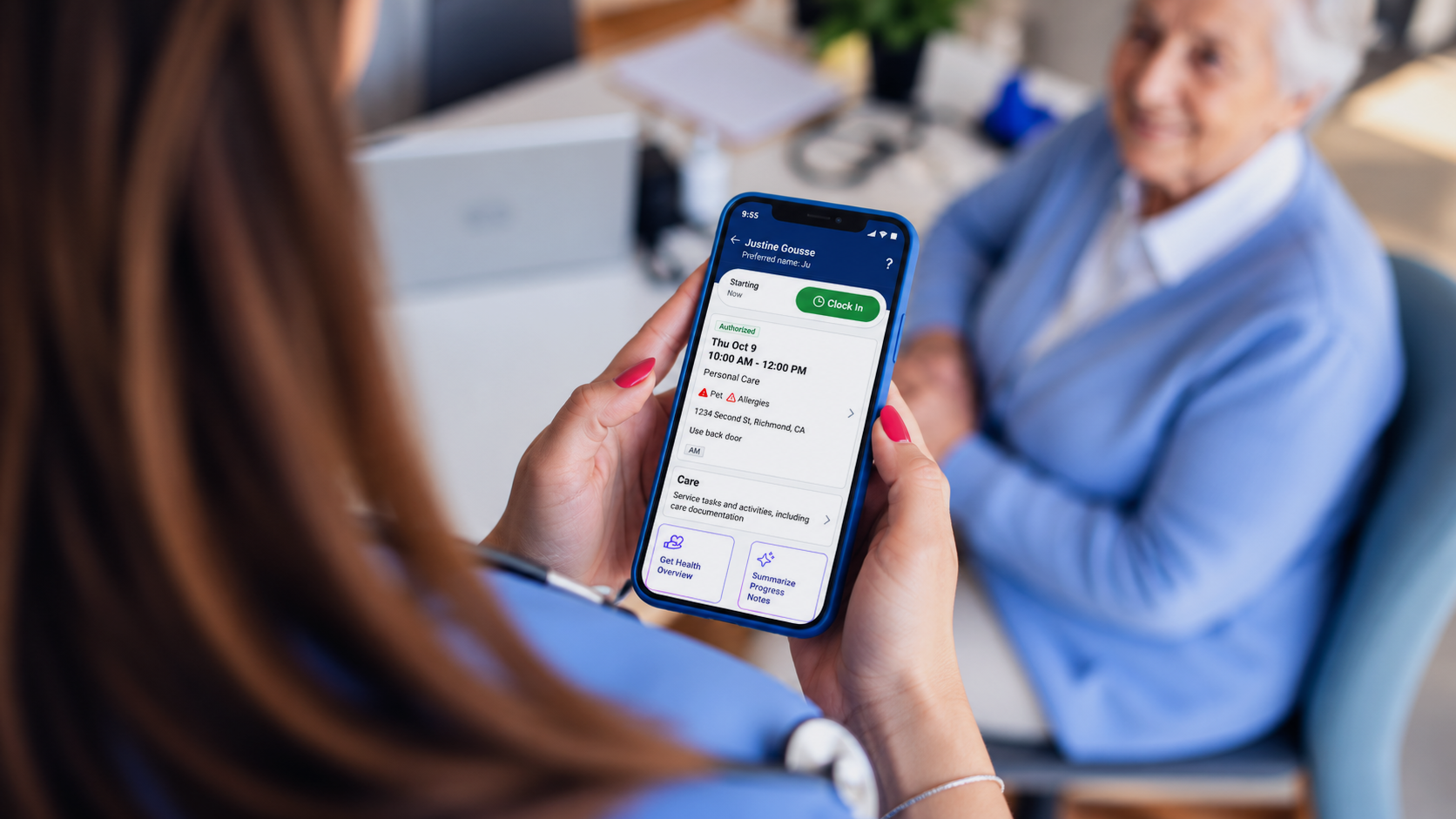
A home care scheduling mobile app puts each caregiver’s schedule and shift offers in their pocket. It lets caregivers act on changes without a phone call, and it records visit times for EVV at the client’s home.
Caregivers feel every schedule change first. Here’s what a caregiver scheduling app should show:
- Schedule: Upcoming visits by day and week, with changes flagged.
- Client details and care plan tasks: What the client needs at each visit.
- Directions: Navigation to the client’s home.
- Shift offers: Open visits they can accept or decline.
- Time-off requests: Requests that feed straight into scheduling.
- Secure messaging: Private messages with schedulers and the care team.
- GPS clock-in: Clock-in and clock-out that capture EVV data at the visit.
Offline mode keeps a home care scheduling mobile app working where cell service drops. Multilingual support lets caregivers read tasks in their own language. AlayaCare’s caregiver mobile app has an offline mode and supports more than 10 languages.
Some caregivers aren’t comfortable with technology. These steps help them adopt the caregiver side of your in-home care scheduling software:
- Train in person: Walk through clock-in and shift offers on the caregiver’s own phone.
- Start with two tasks: Teach the schedule view and clock-in first, then add messaging and offers.
- Pair new users with a peer: A confident caregiver can answer quick questions between visits.
- Set the language on day one: Choose each caregiver’s preferred language before the first shift.
6. Connect schedules to EVV and payroll
Connecting schedules to EVV and payroll turns each planned visit into a verified, paid shift. The schedule sets the expected visit and EVV confirms what happened. Payroll and billing then use the approved result.
Federal law requires states to require EVV. Per the Medicaid.gov EVV requirements, states must require EVV for Medicaid-funded personal care by Jan 1, 2020, and home health by Jan 1, 2023.
Each state chooses its own EVV model and go-live dates, so check your state’s EVV program before you configure anything. The CMS electronic visit verification bulletin lists six elements that EVV must verify:
- Type of service performed: The service code on the scheduled visit.
- Individual receiving the service: The client assigned to the visit.
- Date of the service: The visit date in the schedule.
- Location of service delivery: The client’s address.
- Individual providing the service: The assigned caregiver.
- Time the service begins and ends: The scheduled start and end, confirmed at clock-in and clock-out.
Our advice is to build the schedule so it already carries all six fields. Then EVV in home care only has to confirm them. From there, each visit follows the same chain:
- Scheduled visit: The schedule sets the client, caregiver, service, and time.
- EVV clock-in and clock-out: The caregiver confirms the visit in the mobile app.
- Exception review: A scheduler fixes issues like a missing clock-out or a location mismatch.
- Approval: The visit is marked ready for pay and billing.
- Payroll: Pay is calculated for the caregiver, including overtime and travel.
- Billing: The approved visit becomes a claim against the authorization.
Home care payroll software that shares the schedule’s data keeps this chain intact. AlayaCare’s time and attendance reconciliation compares actual visits against the schedule.
In the target workflow, approved visits then flow straight into billing and payroll. AlayaCare supports zero-to-gross payroll calculations and payroll export for that handoff.
7. Track scheduling KPIs every week
Scheduling KPIs show whether your rules and workflows are working. Pull each metric from the system where its data lives and review the numbers weekly. Set targets from your own baseline instead of borrowed benchmarks.
Home care shift scheduling software already holds most of this data. Use this table to define each KPI and its data source:
KPI | How to calculate | Where the data comes from |
|---|---|---|
Shift fill rate | Filled visits ÷ total scheduled visits for the period | Schedule |
Time to fill | Average time from a visit going vacant to a caregiver confirming it | Vacant visit log and shift offer timestamps |
Missed-visit rate | Visits not delivered ÷ total scheduled visits | Schedule compared with EVV records |
Call-out rate | Call-outs ÷ total scheduled visits | Reason codes and time-off requests from the mobile app |
Continuity rate | Visits delivered by a client’s regular caregivers ÷ that client’s total visits | Visit history per client |
Scheduled vs. actual hours | EVV-verified hours ÷ scheduled hours | Schedule and EVV clock-in and clock-out |
Authorized-hours utilization | Delivered hours ÷ authorized hours | Authorizations and EVV-verified visits |
Overtime hours | Hours above your overtime threshold, per caregiver per week | Time and attendance and payroll |
See AlayaCare’s shift scheduling app in action
Book a demo to see how AlayaCare supports your workflows and evaluate it against your organization’s requirements.
How to manage recurring visits in home care
Most home care is recurring, so the series is the real schedule and each single visit is the exception. To manage recurring visits in homecare, build every series from the authorization and keep it current with regular reviews.
A client with visits two mornings a week has one series and about a hundred visits a year that depend on it. Get the series right, and most of those visits need no extra work.
Build each series from the authorization and care plan
A recurring series should come straight from the client’s authorization and care plan. Its schedule and end date then match what the payer approved, and every visit carries the right tasks.
The authorization sets the limits, and the care plan sets the work. When you’re working out how to manage recurring visits in homecare, start with these settings:
- Frequency and days: Set the visit pattern from the service plan, such as Monday and Thursday mornings.
- Time windows and duration: Match the client’s preferred arrival window and the authorized visit length.
- End date: Tie the series end date to the authorization end date.
- Hours check: Flag any week where scheduled hours exceed authorized hours.
- Care plan tasks: Pull tasks into each visit so caregivers see them in the app.
- Primary and backup caregiver: Assign a primary caregiver plus a named backup.
Handle exceptions without breaking the series
Exceptions change one visit or a short date range while the series template stays the same. Logging a reason for each change keeps recurring visits accurate and gives you a record for audits and payer questions.
Edit the single visit or date range, and leave the template alone. Log a reason code every time. Here’s how common home care scheduling exceptions play out:
- Caregiver vacation: The backup covers those dates, then the series reverts to the primary caregiver.
- Client hospitalization: Put visits on hold, then resume them when the client returns home.
- Care plan change: Update future visits from the change date forward.
- Credential expiry partway through the series: Flag the affected visits early and reassign them if the caregiver doesn’t renew in time.
Review recurring schedules on a set cadence
Recurring schedules drift as authorizations expire and caregivers change. A fixed review cadence catches that drift before it reaches clients. Quick checks run daily, and deeper reviews of authorizations and continuity run weekly or monthly.
Check | Cadence | Why it matters |
|---|---|---|
Upcoming authorization expirations | Weekly | Gives you time to request a renewal before visits run past the end date |
Scheduled vs. authorized hours | Weekly | Catches series that would deliver hours the payer hasn’t approved |
Open visits in the next 14 days | Daily | Leaves time to fill gaps before a client goes without care |
Continuity per client | Monthly | Shows which clients are seeing too many different caregivers |
Series with no end date | Monthly | Finds visits that aren’t tied to a current authorization |
Scheduling across personal care and clinical disciplines
Multi-discipline home care shift scheduling software keeps one calendar for clients who see more than one type of care provider. It respects each role’s scope of practice and visit frequency, and it keeps visits from stacking in the same time window.
Many clients get home health aide visits plus visits from nurses or therapists. Each discipline has its own scope of practice and visit frequency, so an aide can’t take a visit that calls for a nurse. Home health care scheduling software should check those rules before it suggests a match.
Stacking is the other risk, such as a therapist and an aide arriving in the same hour. Home health scheduling software that puts every discipline on one client calendar shows those overlaps early. AlayaCare supports scheduling for nurses and clinicians alongside caregivers on one platform.
Home care shift scheduling software checklist
This home care shift scheduling software checklist turns the seven steps into vendor questions to leverage in demos to test whether a platform can run your real recurring series, call-out, EVV, and payroll workflows.
Capability | Question to ask a vendor |
|---|---|
Authorization-aware recurring series | Can a series end on the authorization end date and flag hours above the authorized amount? |
Configurable matching rules with scheduler approval | Can we set hard and soft rules ourselves, and does the scheduler approve the final match? |
Open-shift offers to mobile | How do offers reach caregivers’ phones, and can we send them in waves? |
Call-out and time-off automation | What happens automatically when a caregiver calls out or requests time off? |
Home care scheduling mobile app (offline, languages) | Does the app work offline, and which languages does it support? |
Integrated EVV for your state | Does your EVV support our state’s model and data requirements? |
Schedule-to-payroll and billing | Do approved visits flow to payroll and billing without re-entry? |
KPI reporting | Can we report fill rate, time to fill, continuity, and authorized-hours utilization without exporting data? |
Support for multiple disciplines | Can home health aides and nurses share one client calendar? |
Put the checklist to work
Home care shift scheduling software protects client care when clean data and clear rules come first. Automate the exceptions next, then connect schedules to EVV and payroll so every visit is staffed, verified, paid, and billed. Book a demo here to see AlayaCare’s shift scheduling software in action.
Published