It’s 7:45 AM, and a home health aide is pulling up to a client’s house with a paper task sheet printed last week. Yesterday the nurse added a new transfer precaution, and the sheet doesn’t show it. The office will also need electronic visit verification (EVV), the digital record that proves a visit happened, before it can bill.
Moments like this are why home care providers move task management onto the phone. Below, you’ll see how a visit works in one, which features matter, and how to roll it out.
What a caregiver mobile app for home care task management does
A caregiver mobile app for home care task management gives agency-employed caregivers each visit’s schedule, care plan tasks, EVV clock-in, and notes on their phone. It syncs everything to the office in real time, so the care team works from the same record.
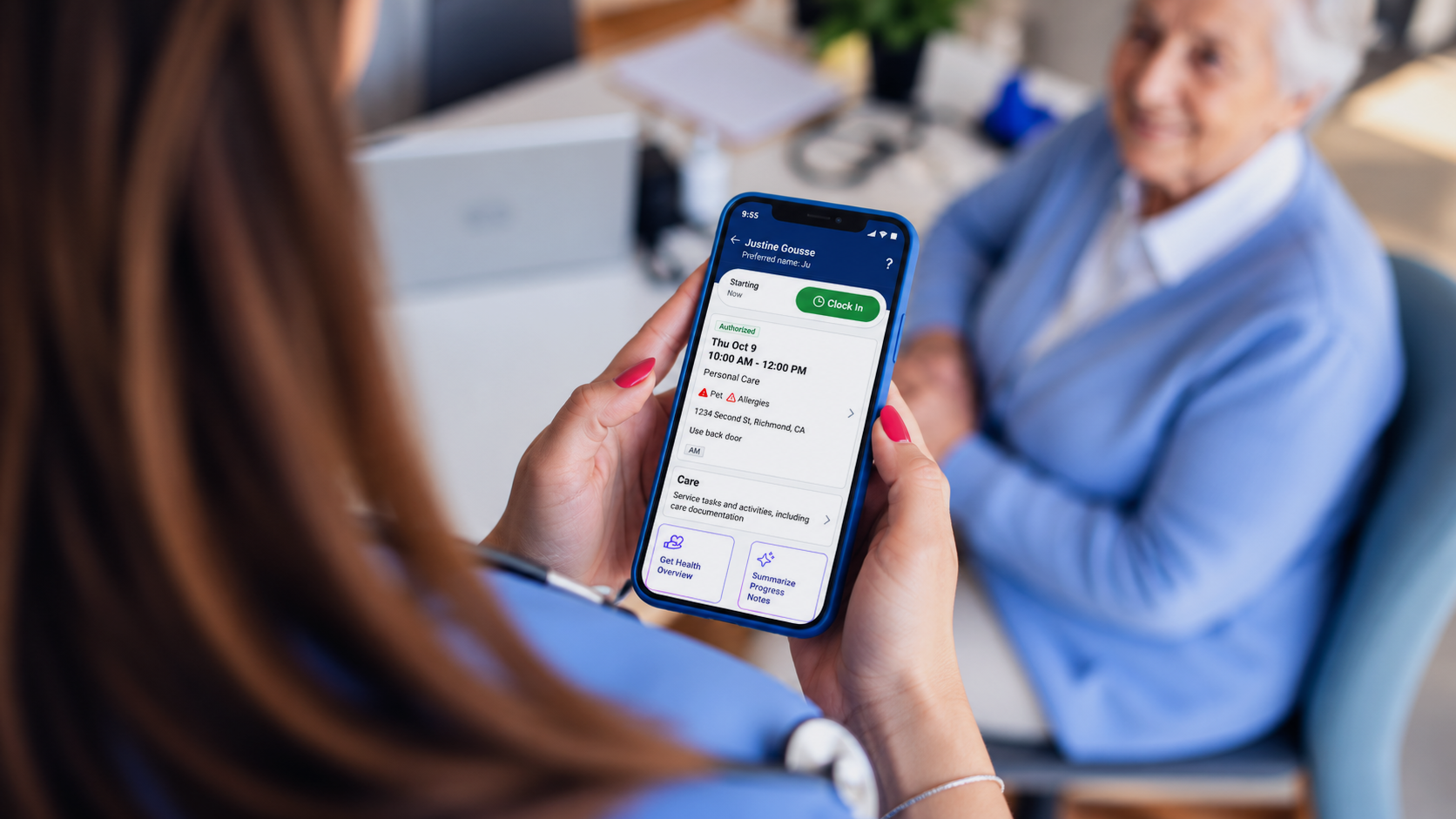
The AlayaCare caregiver mobile app shows caregivers real-time care plans and tasks for every visit. When a nurse updates the plan, the change reaches the caregiver’s phone before the next visit. Most results for a caregiver app or home care mobile app describe family tools, so agency buyers need a way to sort them.
Agency caregiver apps vs. family caregiver apps
Family caregiver apps help unpaid relatives share calendars and medication reminders. Agency caregiver apps support employed home health aides with EVV, care plans, payroll, and billing. Knowing the difference keeps your team from evaluating the wrong category of tool.
Many lists of the best home care app for caregivers mix these groups together. A family app can help a daughter track her dad’s appointments, but it can’t send EVV data to your state or hours to payroll. A home health aide app has to do both.
What you need | Family caregiver app | Agency caregiver app |
|---|---|---|
Who uses it | Unpaid relatives and friends | Employed home health aides and personal care aides |
Scheduling | Shared family calendar | Assigned visits and open shifts from the office |
Care instructions | Personal notes and medication reminders | Care plan tasks set by the clinical team |
EVV | Not built for Medicaid EVV | Clock-in that captures the federal EVV data points |
Documentation | Personal journal or log | Visit notes and forms tied to the client record |
Connects to | Other family members’ phones | Office scheduling, EVV, billing, and payroll |
Why task management matters more as the workforce grows
Demand for home health aides is rising while turnover stays high. That means home care providers onboard new caregivers all year. A caregiver app has to guide each visit as it happens, so a caregiver in week one follows the same care plan as a veteran.
The field is growing fast. Per the BLS aide job outlook, “Employment of home health and personal care aides is projected to grow 18 percent from 2025 to 2035, much faster than the average for all occupations.”
Turnover is the other half. Activated Insights based its 2026 benchmark data on surveys of home care providers. The Activated Insights turnover benchmark shows that “caregiver turnover has flattened at around 75 percent, down from a peak near 80 percent in 2023.”
Put those numbers together and many caregivers on your schedule are still learning your clients. Training can’t cover every routine in advance, so the app has to show the right tasks and prompts at each step.
A caregiver’s visit, step by step in the app
A good caregiver mobile app for home care task management follows the visit in order. The caregiver checks the schedule, clocks in at the door, works through care plan tasks, documents, and clocks out. Each step feeds the office record without a phone call.
Here is the visit in five steps:
- Before the visit: Check the day’s schedule, route, and client details.
- At the door: Clock in with EVV once inside the approved area.
- During care: Work through the care plan checklist task by task.
- Wrapping up: Write the visit note and answer any required questions.
- On the way out: Clock out and let the record sync to the office.
Before the visit: Schedule, route, and client details
Before the visit, the caregiver needs to know where to go and what to expect at the door. The AlayaCare mobile app shows caregivers real-time schedules and routes, plus visit safety information and the client profile for each stop.
Safety details matter most on a first visit, such as a dog in the yard or a client’s fall risk. Look for an app that also puts critical notes from the care team at the top of the visit.
Scheduling from the caregiver’s side matters too. In a good caregiver scheduling app, caregivers accept open visits with one tap instead of trading calls with a coordinator. The AlayaCare Visit Optimizer adds AI-powered visit and route optimization, matching open visits to caregivers by skills and distance.
At the door: EVV clock-in
EVV clock-in is the moment the app proves the visit started. The app records who provided care, for whom, where, and when. For Medicaid-funded visits, this record is required, and it connects directly to whether the visit can be billed.
Federal law sets the baseline for an EVV app. Per Medicaid EVV requirements, “States must require Electronic Visit Verification (EVV) use for all Medicaid-funded PCS by January 1, 2020 and HHCS by January 1, 2023.” PCS means personal care services, and HHCS means home health services.
Every clock-in has to capture six pieces of information. The CMS EVV data requirements list the type of service, the person receiving the service, the date, the location, the person providing the service, and the start and end time.
The AlayaCare mobile app uses GPS EVV with a geofence, which is a virtual boundary around the client’s home. Caregivers can clock in and out only within the approved radius of the client’s home during the scheduled visit. When GPS isn’t an option, caregivers can use IVR (interactive voice response, a phone-based check-in system), which is available in multiple languages.
State rules vary, so don’t treat the federal list as the full picture. Each state picks its own EVV model and aggregator (the state system that collects EVV data), and some add requirements. Check your state Medicaid agency’s rules, then confirm your electronic visit verification software connects to your state’s aggregator.
During the visit: Care plan tasks as a checklist
During the visit, care plan tasks appear as a checklist on the caregiver’s phone. This is the core of a caregiver mobile app for home care task management. Each task gets a clear status, and the office sees it as soon as the record syncs.
Look for an app that lets caregivers mark each task as done, refused, or not done with a reason. A refused task is still useful information. Recorded with a reason, it gives the supervisor an accurate picture of the visit if questions come up later.
Changes in condition need a faster path. If a client seems more confused than usual or has a new bruise, the app should flag it to the supervisor right away. Because the AlayaCare app shows real-time care plans, any update the nurse makes after that flag reaches the next caregiver’s checklist.
After the visit: Notes, clock-out, and sync
After the visit, the caregiver writes notes and clocks out. A home care mobile app should make complete notes easy to write, even for a tired caregiver working in a second language. It should also check the visit is complete before it closes.
The AlayaCare mobile app prompts caregivers for required fields, so gaps get caught while the caregiver is still in the client’s home. Voice-to-form lets a caregiver speak a note instead of typing on a small screen. The app also works in 10 languages, which helps a multilingual team document accurately.
See AlayaCare’s caregiver app in action
Book a demo to see how AlayaCare supports your workflows and evaluate it against your organization’s requirements.
7 features to look for in the best home care app for caregivers
The best home care app for caregivers covers the full visit and connects it to the office. Use these seven features as a scorecard when you compare vendors. Ask each vendor to show every feature live on a phone.
- Care plan task lists: Tasks come straight from the current care plan and update when the plan changes.
- Built-in EVV: Clock-in captures all six federal data points without a separate tool.
- Offline mode: Caregivers keep charting and finishing tasks when the signal drops.
- Guided notes: Required-field prompts and voice input help caregivers write complete notes.
- Open-shift pickup: Caregivers see open visits and accept them with one tap.
- Secure messaging: Caregivers and coordinators talk inside the app, which keeps client details out of personal texts.
- Security controls: Biometric sign-in and role-based permissions limit who sees which client data.
Two of these are easy to overlook in a short demo. Ask about them by name.
1. Offline mode for low-signal visits
Offline mode lets caregivers keep working when a client’s home has weak or no cell service. Rural roads and apartment basements both create dead zones. A home care mobile app without offline mode can leave visits half-documented.
In the AlayaCare mobile app, offline mode covers clock-in and clock-out, forms, daily care tasks, and progress notes. Everything uploads automatically when the phone reconnects, and data stored on the device is encrypted. Read more about offline mode for rural visits.
2. Security on caregivers’ own phones
Some home care providers let caregivers use their own phones for the app. That approach is called BYOD, short for bring your own device. It works well when the caregiver mobile app protects client data with strong sign-in and clear permission rules. Smartphones are common in the US. Set a BYOD policy that says who gets an agency device and what happens to app access when a caregiver leaves.
The AlayaCare mobile app supports fingerprint and face sign-in, so caregivers get in quickly and securely. Role-based permissions limit what each user can see, which supports your obligations under HIPAA, the federal law that protects health information.
How the office sees completed tasks in real time
Every task a caregiver completes in the field should show up in the office right away. AlayaCare dashboards and alerts show EVV exceptions, manual edits, missed clock events, and late notes as visits happen. Coordinators can fix problems the same day, before they reach billing.
Your team sets the standard for a clean visit. Configurable EVV QA rules (quality assurance checks) determine which visits pass and which get an exception flag for review. Verified visit data then flows into billing and payroll without re-entry.
That connection protects margins, because a verified visit becomes a clean claim and an accurate paycheck. AlayaCare caregiver management software keeps certifications and timesheets tied to the same visit record. North Country Home Services reached 95% EVV compliance on AlayaCare’s connected home care app and office view.
How to roll out a caregiver app your team will use
A caregiver app helps only when caregivers use it on every visit. Roll it out in stages, starting with a pilot group, training in caregivers’ own languages, measuring results, and adjusting from feedback. Plan for new hires joining all year.
Even the best home care app for caregivers needs a rollout plan. Show your team tools caregivers actually want, like one-tap open-visit acceptance and an app in their preferred language.
- Start with a pilot: A pilot group tests the app on real visits, so include a new hire and a long-tenured caregiver.
- Train in their language: Run short, hands-on sessions in the languages your caregivers speak, and set each phone’s language on day one.
- Measure from week one: Compare the pilot group’s clock-in compliance and task completion with your current baseline.
- Ask for feedback: Find out what slowed caregivers down, then fix settings or training before you expand.
Metrics to track after launch
Metrics show whether your caregiver mobile app for home care task management is working after launch. Track a short list from day one and compare it with your pre-launch numbers.
Metric | What it shows |
|---|---|
EVV compliance rate | Share of visits that pass your EVV rules without manual edits |
Visit completion | Share of scheduled visits completed as planned |
Missed visits | Visits with no clock-in, caught before they become billing problems |
Late notes | Visit notes submitted after your deadline |
Open shift fill time | How fast caregivers pick up open visits |
Choosing the right caregiver app for your agency
The right caregiver app guides the whole visit and sends clean data to the office. Judge it by how well it fits your full platform, since billing and payroll both depend on what caregivers record in the field.
AlayaCare connects the caregiver mobile app to scheduling, EVV, billing, and payroll on one cloud-based platform. The best home care app for caregivers is the one your team uses on every visit and your office trusts at billing time. Score vendors on the seven features above, then pilot with your own caregivers.
Published